Case study: Gumlet turned ChatGPT mentions into 20% of inbound revenue. Read it →

GEO for HubSpot CMS: Getting a HubSpot-Hosted SaaS Site Cited in AI Answers

The platform-level playbook for making a HubSpot-hosted SaaS site crawlable, structured, and citable across ChatGPT, Perplexity, Gemini, and Google AI Overviews.


TL;DR
- GEO for HubSpot CMS means structuring a HubSpot-hosted site so ChatGPT, Perplexity, Gemini, and Google AI Overviews retrieve and cite it. That is a different job from ranking in the ten blue links, and it needs different work.
- Standard HubSpot pages built with HubL render on the server and cache at the CDN, so AI crawlers can read them. A client-side React build is the trap, because it can show a blank page to the large share of AI crawlers that never run JavaScript.
- You control AI crawlers inside HubSpot under Settings, then Content, then Pages, in the SEO and Crawlers tab. Blocking GPTBot only affects model training, while OAI-SearchBot is the crawler that decides whether ChatGPT search can cite you at all.
- HubSpot gives you no root file access, so an llms.txt file needs either a File Manager upload plus a redirect, or a serverless function that requires a higher plan tier.
- FAQ content marked up with FAQPage schema gets cited by AI at several times the rate of a standard blog post, which makes answer-first question and answer blocks the single highest-yield format on the page.
- You verify AI citations by prompt-testing each engine on a schedule, not through Google Search Console, and the first citations usually take weeks, shaped by how fast crawlers return and how often other sites mention you.
The Problem You Actually Have
You run a B2B SaaS company, your site lives on HubSpot CMS, and your content is genuinely good. A prospect recently told you they found a competitor by asking ChatGPT for the best tool in your category. You typed the same question into ChatGPT, and your brand was not in the answer.
That gap is not cosmetic. Across the clients and sites we work on, visitors who land from an AI answer convert at around 14.2%, while the same site’s Google organic traffic converts at roughly 2.8%. That is more than five times the conversion rate from a channel most competitors are ignoring. A model that skips you is quietly handing away high-intent deals before a buyer ever reaches your pricing page.
Most advice on GEO for HubSpot CMS makes one of 2 mistakes. It is either a partner agency describing a service in vague terms, or it is generic AI search advice with the word “HubSpot” pasted on top, and neither one tells you which setting to touch or where that setting stops working. The thing almost nobody spells out is that HubSpot is a hosted platform with specific limits, and each limit has a specific workaround.
This piece is the platform-level playbook. By the end you will be able to check whether AI crawlers can even reach your HubSpot site, fix your robots.txt for the crawlers that matter, add schema through the page editor, handle the llms.txt question honestly, structure pages so models quote them, and confirm citations without guessing. The first thing to settle is whether the crawlers can read your pages at all, so start there.
Can AI Crawlers Even Reach a HubSpot-Hosted Site?
Yes, standard HubSpot pages are reachable, because HubL is processed on HubSpot’s servers and the finished HTML is cached at the CDN before any crawler arrives. A GEO for HubSpot CMS setup does not fail at the crawler-access layer for ordinary pages built with HubSpot modules and templates. The finished markup is already sitting there, fully formed, when GPTBot or PerplexityBot shows up.
The real risk appears when a team bolts a client-side React app or single-page app onto HubSpot. Research from Vercel and MERJ found that most AI crawlers do not execute JavaScript, so any content that only appears after the browser runs a script can look like an empty shell to them. Your human visitors see a beautiful interactive page, and the AI crawler sees almost nothing.
The Client-Side Rendering Trap
A page that loads its main content through client-side JavaScript can return a blank body to a non-JavaScript crawler, no matter how clean your robots.txt is. Picture a HubSpot page where the hero and the copy are injected by React after load. A search crawler like Googlebot may still render it, but many AI crawlers will read the raw HTML, find nothing useful, and move on without a single citable claim.
The fix depends on how much JavaScript you are running. For most SaaS sites, keeping core content inside HubL modules so it renders server-side is enough, and it costs nothing extra. For a heavy React build, you need a reverse-proxy prerender setup that serves rendered HTML to bots, and that path requires HubSpot’s Enterprise CMS tier, so plan for it before you commit to a JavaScript-first design.
How to Confirm Your Pages Are Readable?
Run a fast check before you touch anything else. Request one of your key pages with an AI crawler user-agent string and read what comes back, or use a crawler-simulation tool that lets you set the user-agent. If the returned HTML contains your headings, your answers, and your body copy, the crawler can read you. If it returns a near-empty container, your rendering, not your content, is the problem.
How to Control AI Crawlers in HubSpot’s robots.txt
HubSpot manages robots.txt through its own interface rather than a file you upload, and you edit it per domain. The path is Settings, then Content, then Pages. Pick the domain from the dropdown, click Override default settings if you are editing a specific domain, open the SEO and Crawlers tab, edit the Robots.txt section, save, and then confirm the live file by visiting yourdomain.com/robots.txt within a couple of minutes.
Getting this right is the highest-leverage move in any GEO for HubSpot CMS project, because a single stray rule can make you invisible to AI answers. Analysis referenced by ziptie.dev estimated that around a quarter of B2B SaaS and ecommerce sites accidentally block major AI crawlers, often through a rule set at the CDN or firewall that nobody remembers adding. A staging block that quietly shipped to production is a common culprit.
The Exact robots.txt Block to Paste
Here is a starting block that allows the AI search and retrieval crawlers while keeping private paths closed. Replace /members/ with your own gated directories.
# Allow AI search and retrieval crawlers, block only private paths
User-agent: OAI-SearchBot
Allow: /
Disallow: /members/

User-agent: GPTBot
Allow: /
Disallow: /members/

User-agent: ClaudeBot
Allow: /
Disallow: /members/

User-agent: PerplexityBot
Allow: /
Disallow: /members/

User-agent: Google-Extended
Allow: /
Disallow: /members/

# Keep HubSpot on-site search working
User-agent: HubSpotContentSearchBot
Allow: /
One HubSpot-specific detail catches teams off guard. If your site uses HubSpot’s native site search module, you have to list HubSpotContentSearchBot as its own user-agent, or your own on-site search will stop crawling your pages. Leaving it out breaks a feature you are paying for.
Which AI Bots to Allow and What Each One Does
The bots are not interchangeable, and blocking the wrong one has the opposite effect you intended. Use this table as your reference.
| User-agent | Company | What it does | Effect if you block it |
|---|---|---|---|
| OAI-SearchBot | OpenAI | Powers live search inside ChatGPT | Removes you from ChatGPT search answers |
| GPTBot | OpenAI | Crawls content that may train models | No effect on ChatGPT citations |
| ClaudeBot | Anthropic | Crawls for Claude | Reduces visibility in Claude answers |
| PerplexityBot | Perplexity | Crawls and cites for Perplexity | Removes you from Perplexity citations |
| Google-Extended | Controls Gemini training use | No effect on Google Search ranking |
Why Blocking GPTBot Does Not Stop ChatGPT From Citing You?
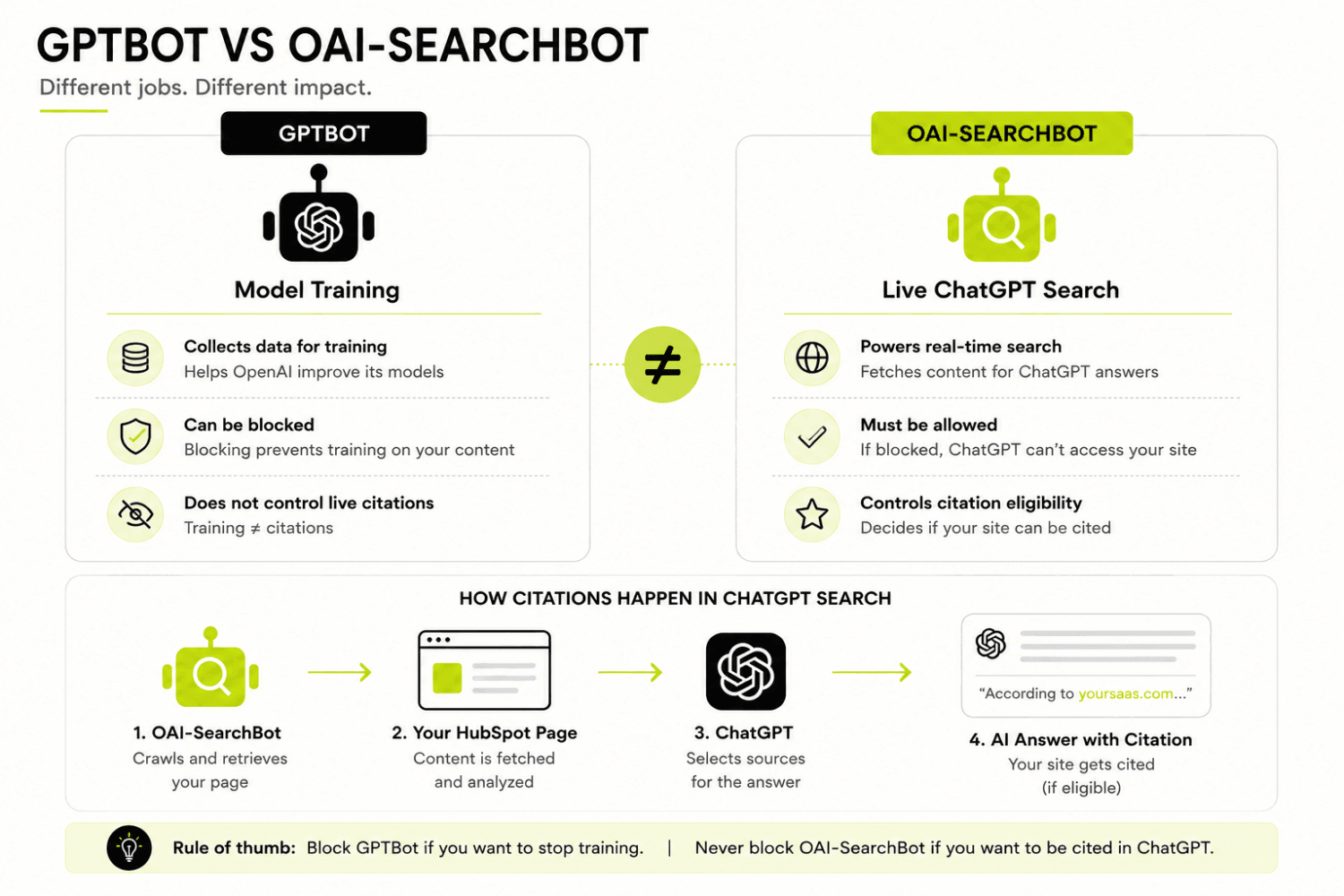
GPTBot and OAI-SearchBot are separate crawlers from the same company, and only one of them controls whether ChatGPT can cite you. GPTBot gathers content that may be used to train OpenAI’s models. OAI-SearchBot is the one that fetches live pages to build the answers ChatGPT shows with citations.
OpenAI’s own documentation makes the split clear: opting out of OAI-SearchBot takes you out of ChatGPT’s search answers, while GPTBot governs training and nothing more. Plenty of SaaS teams block GPTBot to protect their content from training, assume they have protected their privacy, and never realize they left the search crawler wide open or, worse, blocked the search crawler and kept training access on. Check which one you actually restricted, because the two decisions do completely different things.
How to Add Schema Markup and Structured Data on HubSpot CMS?
You add schema on HubSpot by injecting JSON-LD through the page editor’s custom code module or the page’s head HTML, since standard HubSpot pages do not give you raw template-file access. Schema matters for GEO because it hands the model an explicit, machine-readable statement of what a page is about, which raises the odds it extracts your claims correctly. A model guessing from messy module markup is less confident than a model reading a clean FAQPage block.
A Working FAQPage JSON-LD Example
Drop a snippet like this into a custom HTML or code module on the page. It tells engines the page is built as questions and answers, which is exactly the shape they prefer to cite.
{
  "@context": "https://schema.org",
  "@type": "FAQPage",
  "mainEntity": [
    {
      "@type": "Question",
      "name": "Can HubSpot CMS get cited in AI answers?",
      "acceptedAnswer": {
        "@type": "Answer",
        "text": "Yes. HubSpot pages render server-side, and with correct robots.txt, schema, and answer-first structure they can be cited by ChatGPT, Perplexity, Gemini, and Google AI Overviews."
      }
    },
    {
      "@type": "Question",
      "name": "Where do I add schema on a HubSpot page?",
      "acceptedAnswer": {
        "@type": "Answer",
        "text": "Insert JSON-LD through a custom code module in the HubSpot page editor, or in the page head HTML."
      }
    }
  ]
}
Keep the answer text in the schema matched to the visible answer on the page. Engines distrust schema that says one thing while the page says another, and a mismatch can cost you the citation you were trying to earn.
Using HubDB to Serve Structured, Extractable Facts
HubDB is HubSpot’s built-in table tool, and it is a quiet advantage for GEO for HubSpot CMS. Store repeatable facts, pricing rows, feature specs, or comparison data in a HubDB table, then surface them on a page as a rendered table that crawlers read as clean structured content. Models pull structured comparison data far more readily than they pull the same facts buried in prose.
A simple pricing table in HubDB might use columns like these:
- Plan name
- Monthly price
- Seat limit
- Standout feature
- Best for
Rendered on the page, that table becomes a block a model can lift straight into an answer about your category, with your brand attached to each row.
The llms.txt Problem on HubSpot and the Two Real Workarounds
A true root-level /llms.txt is not natively possible on HubSpot, because the platform is hosted and does not let you place a file at your domain root. There is also honest debate about whether llms.txt changes citations at all right now, since adoption by the major engines is still uneven. Treat it as a cheap experiment, not the lever that decides your AI search visibility.
You have two workable paths, and each carries a caveat.
- Upload and redirect. Upload your llms.txt in Marketing, then Files and Templates, then Files, copy the file URL, and create a redirect from /llms.txt in Settings, then Content, then URL Redirects. This is the ten-minute option, and the caveat is that some crawlers may treat a redirected file differently from a genuine root file.
- Serverless function. Serve the file dynamically with a HubSpot serverless function so it lands at the root path. This lands closer to a real root file, but it requires HubSpot’s Enterprise CMS tier or a developer sandbox, and some teams report that serverless routing struggles with a period in the path like /llms.txt.
One more practical limit is worth knowing before you build the serverless route. HubSpot caps serverless execution at 600 total seconds per minute across your account, so a function serving llms.txt is fine for normal traffic but is not meant to carry heavy dynamic loads. For most SaaS sites, the upload-and-redirect method is the sensible starting point, and you can graduate to serverless if you move to Enterprise anyway.
How to Structure a HubSpot Page So AI Engines Cite It?
Models extract and attribute information at the claim level, not the article level, so a page earns citations by leading every section with a dense, specific answer. A page that buries its answer three paragraphs down gives the model nothing clean to lift. The structure of the page matters as much as the facts inside it.
Here are the on-page patterns that consistently earn extraction:
- Question-phrased H2s that mirror how a buyer would ask the question out loud.
- A direct one to two sentence answer immediately under each H2, before any expansion.
- A short summary block near the top, which is often the chunk a model pulls first.
- A definition on the first use of any technical term.
- One named example instead of a vague “many companies.”
- Precise numbers and ranges instead of soft quantifiers.
The Answer-First Pattern, With a Before and After
The single fastest structural fix is moving your answer to the first sentence of the section. Compare these two openings for a section titled “How much does GEO for HubSpot CMS cost?”
The buried version reads: “Pricing in this space has shifted a lot over the past year, vendors bundle different services, and a lot depends on your goals and current setup, so it can be hard to give a clean figure.” A model reads that and finds no answer to quote.
The answer-first version reads: “GEO for HubSpot CMS typically runs between a few thousand dollars a month for a focused engagement and higher for full-scope work. Costs rise with the number of query clusters you target and the amount of net-new content required.” Now the model has a clean, citable claim in sentence one, and it can expand from there.
Why FAQ Sections Earn Citations at Several Times the Rate
FAQ blocks marked up as questions and answers are the highest-yield GEO format on any page, full stop. Diagnostic work by The Pedowitz Group across more than 150 B2B brands found that FAQ content earns AI citations at roughly three to four times the rate of standard blog posts of comparable authority. The reason is simple: answer engines exist to produce answers, so they favor content already shaped as a question with a tight response.
This is why the FAQPage schema section earlier is not a nice-to-have. A well-built FAQ, backed by matching schema, gives you many small, extractable answer units on a single page. Each one is a separate chance to get cited.
HubSpot CMS Limitations for GEO and the Fix for Each
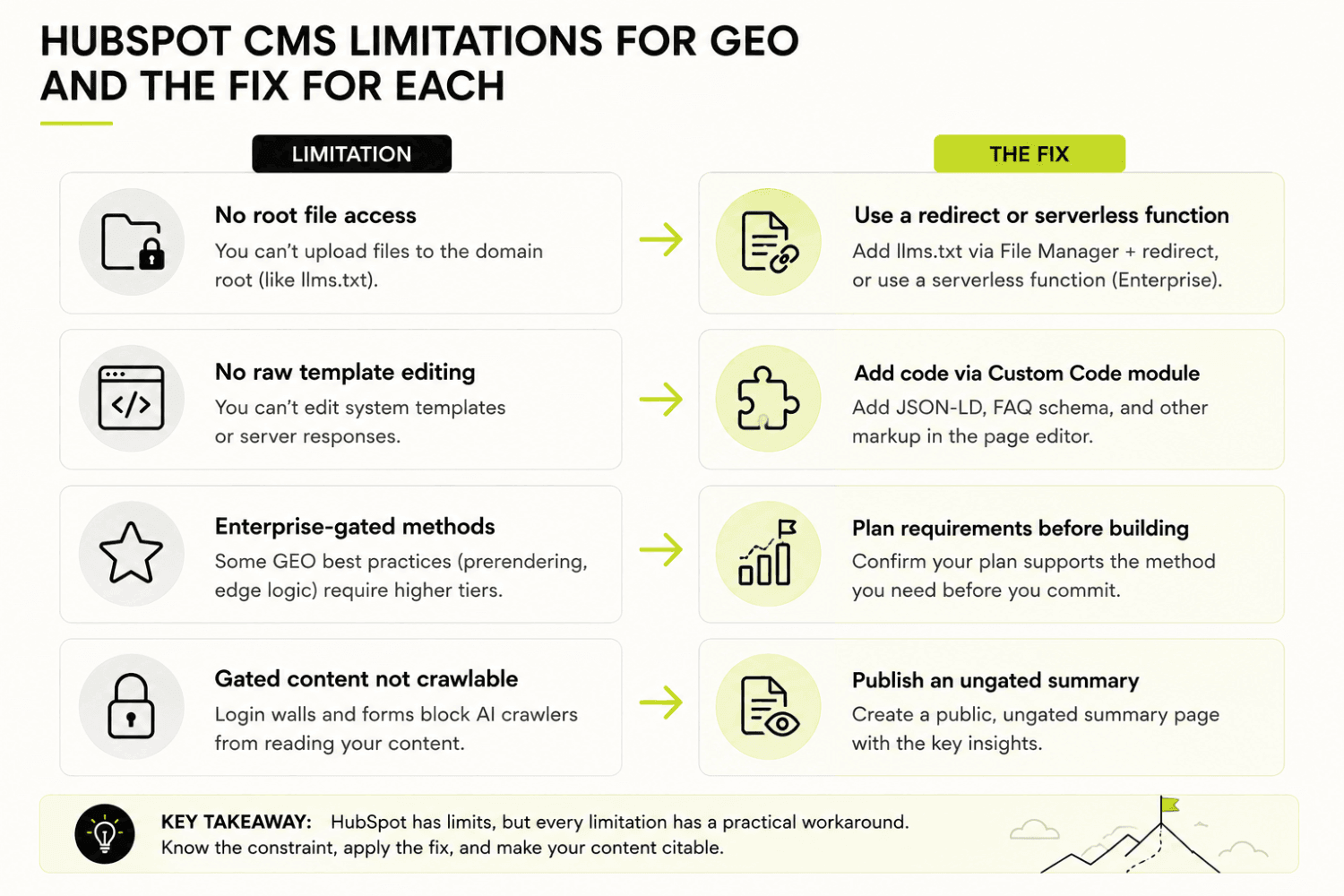
HubSpot’s constraints are real, but every one of them has a documented workaround, and knowing the ceiling is what separates a deliberate setup from a lucky one. The platform trades some raw flexibility for a managed, secure environment, which is a fair deal for most SaaS teams. What you lose in file-level control you can recover through the mechanisms HubSpot does give you.
Here are the limits that matter for GEO for HubSpot CMS, each with its fix:
- No root file access. Handle llms.txt with the upload-and-redirect or serverless method described above.
- Head edits happen through modules or settings, not raw template files on standard pages. Use the custom code module for schema.
- Some methods are gated to the Enterprise tier. Decide on plan level before you design a JavaScript-heavy or serverless-dependent setup.
- Content behind forms or membership is not crawlable. Publish an ungated version of the key claims.
HubSpot CMS vs WordPress for GEO
WordPress gives you more raw control, and HubSpot gives you a cleaner managed setup, so the honest answer is that both can win at AI search with the right work. The table below lays out where each one stands.
| Capability | HubSpot CMS | WordPress |
|---|---|---|
| robots.txt control | Through the SEO and Crawlers settings, per domain | Direct file or via SEO plugin |
| Schema injection | Custom code module in the page editor | Plugin or theme templates |
| Root-level llms.txt | Not native, needs redirect or serverless | Direct file upload to root |
| Default server-side rendering | Yes, HubL renders on the server | Depends on theme and plugins |
| Plugin and file flexibility | Managed, more limited | High, full file access |
The takeaway is not that one platform is better. It is that HubSpot’s limits are known and solvable, so a HubSpot-hosted SaaS site has no structural excuse for staying invisible in AI answers.
Gated and Members-Only Pages Are Invisible to AI
Anything behind a HubSpot form gate or membership wall cannot be crawled, so it cannot be cited. Your best case study, locked behind a lead form, contributes nothing to your AI search visibility. The model never sees it.
The fix is to publish an ungated summary version that carries the core claims, the key numbers, and the named examples, then point that summary to the full gated asset for readers who want the deep version. You keep the lead capture, and you give the crawler something real to cite. That way one asset serves both the buyer and the model.
How to Track Whether Your HubSpot Site Is Getting Cited
You cannot see AI citations in Google Search Console, so you verify them by prompt-testing each engine on a fixed schedule and logging what you find. This is the step teams skip, and it is why so many of them cannot tell whether their GEO for HubSpot CMS work is paying off. Guessing is not measurement.
A Simple Citation Tracking Method
Set up a repeatable process and run it on a cadence, monthly at a minimum:
- List your 10 to 15 highest-intent buyer queries, the questions a real prospect would ask before choosing a vendor.
- Run each query in ChatGPT, Perplexity, Gemini, and Google AI Overviews.
- Record whether your brand appears, which URL got cited, and where you sat relative to competitors.
- Log everything in a sheet with columns for Query, Engine, Cited or not, Cited URL, Date, and Notes.
- Repeat on the same schedule so you can see movement over time, not a single snapshot.
Watch the comparison queries closely, because that is where deals are won and lost. Research from Zenith AI found that ChatGPT cites competitor websites noticeably more often than Google does on the same queries, so a “best X for Y” prompt is exactly where an absent citation costs you a buyer.
HubSpot’s Native AEO Tools and Where They Stop
HubSpot now ships its own AEO features, and they are useful for measurement. The set includes a Brand Visibility Dashboard, Prompt Tracking with recommendations, Citation Analysis, and support across ChatGPT, Gemini, and Perplexity. If you already pay for the relevant tier, they save you some manual prompt-testing.
The honest boundary is this: these tools track and recommend, they do not implement. HubSpot’s dashboard can tell you that you are missing from a set of prompts, but it will not fix your robots.txt, write your FAQPage schema, or restructure your pages to answer-first. The measurement is on the platform, and the actual GEO work is still on you.
How Long Before a HubSpot Page Shows Up in AI Answers
Expect the first citations in weeks, not days, once your pages are crawlable and structured correctly. Two factors move that timeline: how frequently the AI crawlers return to your site, and how much outside corroboration you have, meaning mentions in comparison roundups, reviews, and independent articles. A page nobody else references takes longer to earn trust than a page the wider web already talks about.
The HubSpot GEO Setup Checklist
Turn everything above into one sequence you can run this week. Each step is a single action, and together they take a HubSpot-hosted SaaS site from invisible to citable.
- Confirm your key pages render server-side, and move any client-side content into HubL modules.
- Audit your robots.txt and explicitly allow OAI-SearchBot, GPTBot, ClaudeBot, PerplexityBot, and Google-Extended, plus HubSpotContentSearchBot if you use site search.
- Add FAQPage schema through a custom code module on your highest-intent pages.
- Publish ungated summaries of any gated case studies or resources.
- Rewrite your top pages to answer-first structure, with the answer in sentence one under each H2.
- Pick an llms.txt method based on your plan tier, and ship it as an experiment.
- Build a citation tracking sheet and run your prompt tests on a monthly cadence.
Work through it in order, because each step assumes the one before it is done. There is no point structuring content for a crawler that your rendering is hiding.
Frequently Asked Questions
Does HubSpot have built-in GEO or AEO tools?
Yes. HubSpot offers a Brand Visibility Dashboard, Prompt Tracking with AI-generated recommendations, Citation Analysis, and multi-engine support across ChatGPT, Gemini, and Perplexity. These features track how your brand appears in AI answers and suggest prompts worth targeting. The important limit is that they measure and recommend rather than implement. HubSpot will tell you that you are missing from a set of prompts, but it will not edit your robots.txt, write your schema, or restructure your pages. You still do the actual GEO for HubSpot CMS work, then use the dashboard to confirm whether it moved the needle.
Can you edit robots.txt on HubSpot CMS?
Yes. Go to Settings, then Content, then Pages, choose the domain from the dropdown, click Override default settings if you are editing a single domain, open the SEO and Crawlers tab, and edit the Robots.txt section. Save your changes, then confirm the live file by visiting yourdomain.com/robots.txt within a couple of minutes. HubSpot lets you set rules for all connected domains at once or override per domain. If you use HubSpot’s on-site search, remember to allow HubSpotContentSearchBot as its own user-agent, or your internal search will stop crawling your pages.
Does blocking GPTBot stop ChatGPT from citing my site?
No. GPTBot and OAI-SearchBot are different crawlers from OpenAI that do different jobs. GPTBot gathers content that may train OpenAI’s models, and blocking it has no effect on whether ChatGPT can cite you. OAI-SearchBot is the crawler that fetches live pages for ChatGPT’s search answers, and it is the one that controls your citation eligibility. If you want to stay out of model training but still get cited in ChatGPT, block GPTBot and allow OAI-SearchBot. Blocking the search crawler by mistake is the error that quietly removes you from ChatGPT answers.
Can HubSpot host an llms.txt file at the root?
Not directly, because HubSpot is a hosted platform that does not give you access to your domain root. You have two workarounds. The first is to upload the file in the HubSpot File Manager and create a redirect from /llms.txt to the file URL, which takes about ten minutes. The second is to serve it with a serverless function so it lands at the root path, though that requires the Enterprise CMS tier or a developer sandbox. Adoption of llms.txt across the major engines is still uneven, so treat it as a low-cost experiment rather than the setting that decides your AI search visibility.
Is HubSpot CMS actually good for AI search visibility, or should I move off it?
HubSpot is a solid base for AI search visibility, so moving off it is rarely worth the disruption. Standard HubSpot pages render server-side and cache at the CDN, which means AI crawlers can read them without any special work. The platform supports per-domain robots.txt control and schema injection through custom code modules. The tradeoffs are limited root file access and some Enterprise-gated methods, both of which have documented workarounds. A HubSpot-hosted SaaS site that stays invisible in AI answers is almost always missing configuration or content structure, not held back by the platform itself.
Why does my competitor get cited in ChatGPT when my content is better?
Better content that is structured for humans still loses to weaker content that is structured for extraction. Models cite discrete, specific claims placed near the top of a section, backed by clear definitions and precise numbers, and reinforced by mentions elsewhere on the web. Your competitor is likely leading with direct answers, using FAQ blocks with schema, and getting named in comparison articles, while your stronger content buries its answer or hides it behind a form. Quality alone does not earn the citation. The combination of crawlable structure, claim density, and outside corroboration is what wins the mention.
The Bottom Line
Getting a HubSpot-hosted SaaS site cited in AI answers is a configuration and structure problem, not a platform problem, and that is the good news. The sites that win in AI search are not the ones with the fanciest content. They are the ones that made their pages crawlable, led with clean answers, marked up their FAQs, and then checked the results instead of hoping.
Start this week by pulling your robots.txt and confirming that OAI-SearchBot, PerplexityBot, ClaudeBot, and Google-Extended are allowed, because a single blocking rule can undo every other effort on this list. Then rewrite your three highest-intent pages to answer-first structure and add FAQPage schema through a custom code module. Those two moves alone put you ahead of most competitors who are still treating AI search visibility as luck.
The engines are still early, and their crawlers, tools, and preferences will keep shifting over the next year. A HubSpot site that already renders cleanly, answers directly, and gets mentioned across the wider web is the one positioned to pick up citations as each new engine matures. Build that foundation now, and you stop waiting to be found by accident.
Written byApoorv SharmaCo-founder, DerivateX
Apoorv Sharma is the co-founder of DerivateX, a B2B SaaS SEO and Generative Engine Optimization agency that engineers AI citations in ChatGPT, Perplexity, Claude, and Gemini and connects them to demo bookings and revenue pipeline. He is the author of the 2026 AI Visibility Benchmark Report and the Citation Engineering methodology. He's also the brain behind "Found On AI" and has sold 2 of his companies previously
Reviewed byAyush SharmaHead of SEO & Content, DerivateX
Ayush Sharma is Head of SEO and Content at DerivateX, a full-service SEO and GEO agency for B2B SaaS. He focuses on SEO, GEO, and AI visibility for software brands, helping them get found and cited across Google, AI Overviews, ChatGPT, Perplexity, Gemini, and Claude, with results measured through to pipeline. On the DerivateX blog he covers AI visibility tracking, how LLMs choose which sources to cite, technical and JavaScript SEO for SaaS sites, and attributing AI search to revenue in HubSpot.
Cited by AI