Case study: Gumlet turned ChatGPT mentions into 20% of inbound revenue. Read it →

12 SEO Questions to Ask Before Rebuilding Your B2B SaaS Website

A rebuild is the easiest way to lose rankings and AI citations you already earned. Ask these 12 questions before anyone opens a design file.


Last updated: November 3, 2026. Search engine and AI crawler behavior is taken from Google, OpenAI, Perplexity and Anthropic documentation read on that date.
Before you rebuild a B2B SaaS website, ask 12 SEO questions in four phases: what the current site earns from search, which URLs carry that value, how every changed URL redirects, and whether the new build can be read by Google and AI crawlers. The questions that protect pipeline are the ones about URLs, rendering, crawler access, structured data and tracking, because a rebuild that breaks any of them loses Google rankings and AI answer citations at the same time.
Most redesign checklists were written for Google alone. In 2026 a B2B SaaS site is also read by OAI-SearchBot for ChatGPT search, PerplexityBot and Claude-SearchBot, and Google’s own AI Overviews and AI Mode only use pages that are indexed and eligible for a snippet. A new design system, a CMS move or a rewritten homepage can quietly change all of that. This guide gives you the 12 questions to ask your team and your web agency before anyone opens a design file, what a good answer sounds like, and the red flag answers that should stop the project.
Key takeaways
- Baseline first: export Search Console clicks by page and query, GA4 key events, CRM pipeline by landing page and a fixed set of AI buyer prompts before the brief is signed.
- Every changed URL needs one server-side permanent redirect to its closest equivalent. Google says not to send many old URLs to the home page and to keep redirects for at least a year.
- Content must ship in the HTML. Google notes that not all bots can run JavaScript, and AI crawlers are among the ones that read the raw response.
- Check robots.txt, CDN and firewall rules for AI crawlers such as OAI-SearchBot, PerplexityBot and Claude-SearchBot, not only Googlebot.
- Change one thing at a time. Google advises moving domain, CMS and layout in separate steps, not in one launch.
- Rebuild tracking before launch and name one owner for the first 90 days, with rollback triggers agreed in advance.
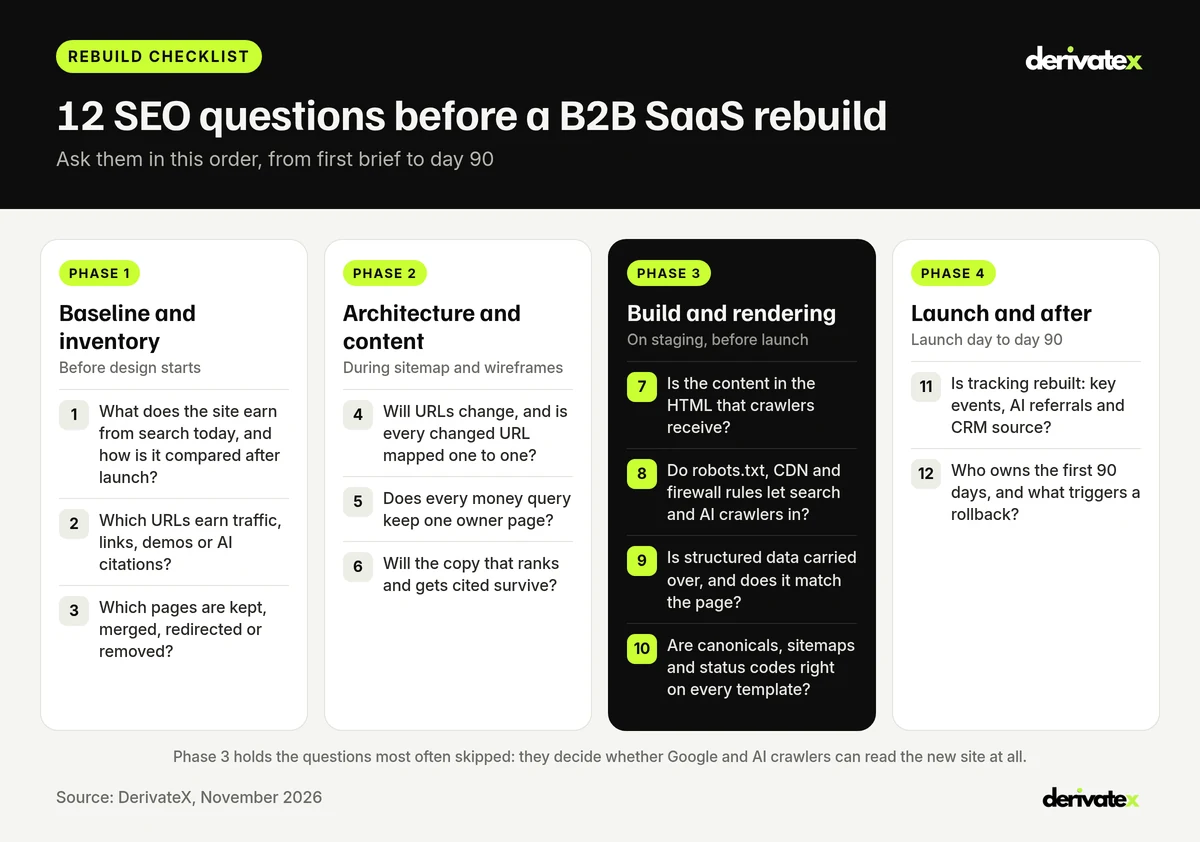
The 12 SEO Questions at a Glance
Use this table as the agenda for the kickoff meeting with your web agency or internal build team. Each question has a point in the project where it must be answered, an owner, and an answer that should make you pause the project until it is fixed.
| Question | Ask it | Owner | Red flag answer |
|---|---|---|---|
| 1. What does the site earn from search today? | Before the brief | SEO lead | “We will check traffic after launch” |
| 2. Which URLs earn traffic, links, demos or citations? | Before the brief | SEO lead | “We only need the main pages” |
| 3. Which pages are kept, merged, redirected or removed? | Before sitemap | SEO and content | “Old blog posts will not move” |
| 4. Is every changed URL mapped one to one? | Sitemap stage | SEO and developers | “Anything missing goes to the home page” |
| 5. Does every money query keep one owner page? | Wireframes | SEO and product marketing | “Navigation is a design decision” |
| 6. Will the copy that ranks and gets cited survive? | Copywriting | Content lead | “All copy is being rewritten for the new brand” |
| 7. Is the content in the HTML crawlers receive? | Staging | Developers | “Google runs JavaScript, so it is fine” |
| 8. Can search and AI crawlers get through robots.txt, CDN and firewall? | Staging | Developers and IT | “Bot protection is on by default” |
| 9. Is structured data carried over and accurate? | Staging | SEO and developers | “The plugin will handle schema” |
| 10. Are canonicals, sitemaps and status codes right on every template? | Staging and launch | SEO and developers | “We will fix errors once Search Console reports them” |
| 11. Is tracking rebuilt, including AI referrals? | Before launch | Marketing ops | “Analytics is a launch week task” |
| 12. Who owns the first 90 days, and what triggers a rollback? | Before launch | Project owner | “The agency hands over at launch” |
Phase 1: Baseline and Inventory Questions
Phase 1 decides whether you can measure the rebuild at all. Without a baseline, nobody can tell a normal post-launch dip from a real loss, and the conversation after launch turns into opinions.
1. What does the current site earn from search, and how will it be compared after launch?
Record what the site produces from Google and AI search today, in the same units you will report after launch. That means search performance, conversions and pipeline, not only traffic. Export as much history as Search Console allows, because a three-month export cannot show seasonality.
A good answer includes:
- Search Console clicks and impressions by page and by query, exported and stored outside the tool.
- Search Console’s generative AI report, which Google launched on June 3, 2026, for impressions in AI Overviews and AI Mode by page.
- GA4 key events (demo requests, trials, contact forms) by landing page, plus CRM pipeline by original landing page.
- A fixed set of 25 to 50 buyer prompts run in ChatGPT, Perplexity, Gemini and Google AI Overviews, with the brand and cited URLs recorded.
Red flag answer: “We will look at traffic after launch.” By then the old data is the only baseline you have, and the old templates are gone. For the KPIs worth keeping in that baseline, see SaaS SEO KPIs by stage.
2. Which URLs earn traffic, links, demos or AI citations?
Build one URL inventory from every source, then mark each URL with the value it carries. A crawl of the live site misses orphan pages, and the CMS export misses pages built outside it. Combine them.
A good answer includes:
- A crawl of the live site, the XML sitemaps, the CMS export and every landing page with sessions in GA4.
- Search Console’s links report, which Google’s site move guide recommends saving as the list of sites linking to your old URLs.
- For each URL: clicks, key events, pipeline, referring domains, and whether AI answers cite it on your tracked prompts.
- Docs, help center, integration and changelog pages on subdomains, which are often left out of a marketing site project.
Red flag answer: “We only need the main pages.” B2B SaaS sites often earn demos from integration, comparison and help pages that nobody on the brand team thinks of as main pages.
3. Which pages are kept, merged, redirected or removed, and why?
Give every URL a written decision before the new sitemap is drawn. A rebuild is the cheapest moment to prune, but only if the decision rests on data from questions 1 and 2, not on what looks dated.
- Keep: pages with clicks, demos, links or AI citations, and pages that answer an active buyer query.
- Merge: pages that compete for the same query. Google allows redirecting several old URLs to one consolidated page when the content moved there.
- Redirect: pages whose content moves to a new URL.
- Remove: pages with no traffic, links, conversions or purpose. Return a 404 or 410 rather than redirecting them somewhere unrelated.
DerivateX publishes the rules it uses for these calls in SaaS content pruning: 6 rules to keep, merge, redirect or delete pages.
Red flag answer: “Old blog posts will not move to the new CMS.” Unless each one has a decision, that is a mass deletion of pages that can carry links and citations.
Phase 2: Architecture and Content Questions
Phase 2 is where most search value is lost by accident, because sitemap and copy decisions are made by people who never see the Search Console data.
4. Will any URLs change, and is every changed URL mapped one to one?
Every URL that changes needs a server-side permanent redirect to its closest equivalent, listed in one redirect map that is tested before launch. Google’s redirects documentation ranks server-side redirects (301 or 308) as the type it is most likely to interpret correctly, and says to use JavaScript redirects only when server-side or meta refresh redirects are not possible.
A good answer includes:
- A spreadsheet with every old URL, its new URL, the redirect type and a tested status code.
- No redirect chains: the old URL goes straight to the final URL.
- Internal links updated to the new URLs, so the site does not rely on its own redirects.
- Redirects kept for at least a year. Google’s site move guide says this gives it time to transfer signals, and suggests keeping them indefinitely for users.
Red flag answer: “Anything without a match goes to the home page.” Google warns that redirecting many old URLs to one irrelevant page, such as the home page, can be treated as a soft 404.
5. Does the new information architecture give every money query one owner page?
The new sitemap should give each commercial query exactly one page that owns it: pricing, alternatives, comparisons, use cases, integrations and industry pages. Navigation is not cosmetic. It decides which pages get internal links from every template, and Google lists making content findable through internal links among the basics for its AI features.
A good answer includes:
- A keyword and prompt map that assigns each money query to one URL type before wireframes start.
- No two new pages built for the same query, which splits links and leaves AI answers to pick between them.
- Commercial pages linked from the main navigation or footer, not buried three clicks deep.
For how DerivateX maps queries to page types, see SaaS keyword mapping by page type.
Red flag answer: “Navigation is a design decision.” It is also the strongest internal linking decision on the site.
6. Will the copy that ranks and gets cited survive the redesign?
Freeze the URLs, titles, headings and main copy of the pages that earn search traffic and AI citations, and rewrite them in a second release. A new brand voice can remove the exact phrases that matched buyer queries, and AI answers often quote a definition, a price or a comparison line from a specific page.
A good answer includes:
- A list of protected pages from question 2, with their current title, H1 and answer paragraphs saved.
- Important facts kept as text, not baked into images or sliders. Google asks site owners to make sure important content is available in textual form.
- Pricing, integration lists and product facts kept identical to what sales and AI answers already state, unless they have actually changed.
Red flag answer: “All copy is being rewritten for the new brand.” Rewrite later, page by page, once you can measure each change.
Phase 3: Build and Rendering Questions
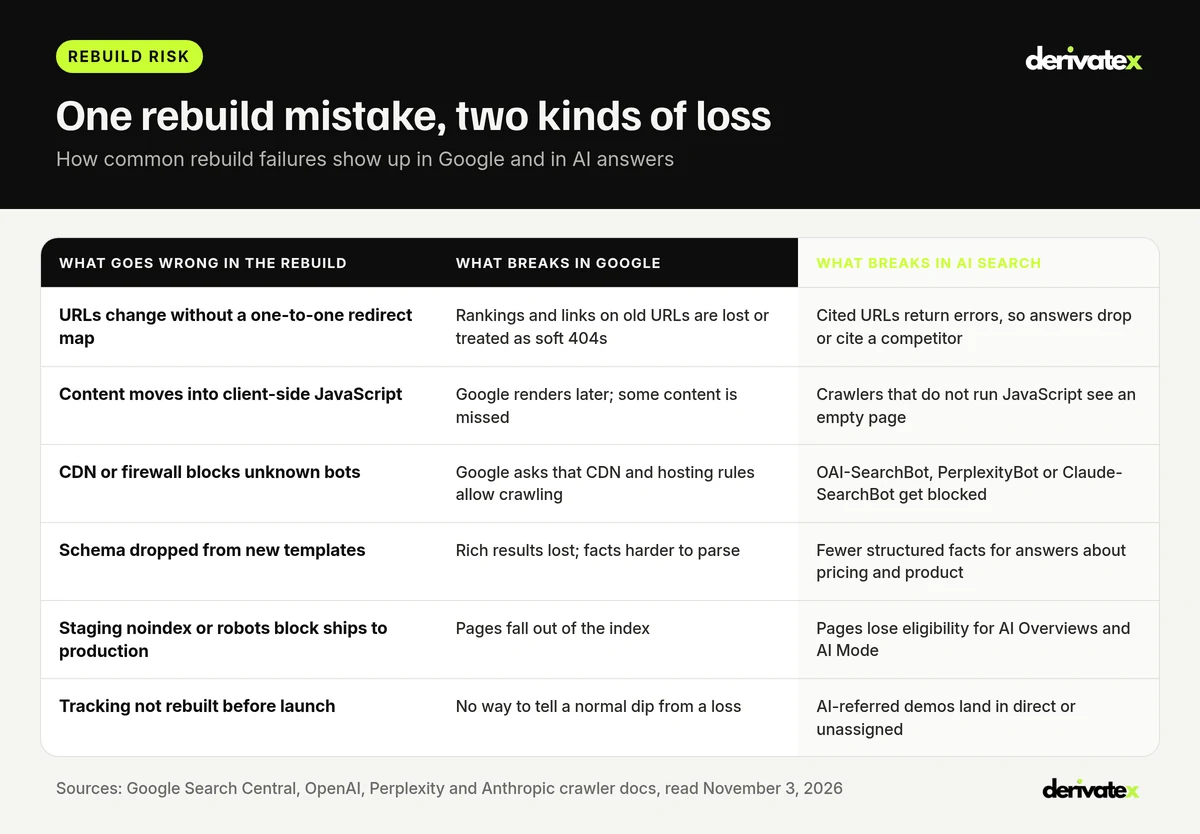
Phase 3 is the most skipped phase, and the one that decides whether Google and AI crawlers can read the new site at all. Ask these on staging, with the real templates, before the launch date is fixed.
7. Will the content be in the HTML that crawlers receive?
The text, links and structured data of every important page should be in the server response, not added later by client-side JavaScript. Google can render JavaScript, but its JavaScript SEO guide says pages wait in a render queue and that server-side or pre-rendering “is still a great idea” because not all bots can run JavaScript. Crawlers behind AI search products are a large part of that group.
A good answer includes:
- Server-side rendering, static generation or pre-rendering for marketing pages, blog posts and docs.
- A test that fetches each template with JavaScript turned off and finds the H1, body copy and links.
- Real HTTP status codes on missing pages, not a 200 with a “not found” message.
If the new stack is Next.js, Webflow or HubSpot, DerivateX covers the common traps in Next.js SEO traps for B2B SaaS and JavaScript SEO rendering failures in AI search.
Red flag answer: “Google runs JavaScript, so it is fine.” Google is one crawler, and even Google renders on a delay.
8. Do robots.txt, CDN and firewall rules let Google and AI crawlers in?
Check every layer that can block a crawler: robots.txt, CDN bot settings, firewall rules and rate limits. A rebuild often arrives with a new host or CDN and default bot protection. Google’s AI features guide lists making sure crawling is allowed in robots.txt and by any CDN or hosting infrastructure as a basic.
| Crawler | Used for | What the vendor says |
|---|---|---|
| Googlebot | Google Search, AI Overviews and AI Mode | robots.txt rules for Googlebot are the control for Search, including its AI features |
| OAI-SearchBot | ChatGPT search | Sites opted out will not be shown in ChatGPT search answers; robots.txt changes take about 24 hours to apply (OpenAI) |
| PerplexityBot | Perplexity search results | Allow it in robots.txt and permit its published IP ranges in your firewall (Perplexity) |
| Claude-SearchBot | Search results in Claude | Blocking it can reduce visibility and accuracy in user search results (Anthropic) |
A good answer includes:
- The production robots.txt written and reviewed before launch, with staging blocks removed.
- CDN and firewall rules tested against the crawlers above, using the IP ranges each vendor publishes.
- A decision on training crawlers made separately from search crawlers, since each vendor treats them as independent settings.
DerivateX lists the robots.txt errors it sees most often in common robots.txt mistakes that hurt SEO.
Red flag answer: “Bot protection is on by default.” Then ask which bots it blocks, and test them.
9. Which structured data carries over, and does it match the visible page?
List every schema type on the current site and confirm each one exists on the new templates, with values that match the visible text. Google’s structured data guidelines say not to mark up content that is hidden from readers, and its AI features guide asks that structured data match the visible text.
A good answer includes:
- Organization and logo markup on the home page, with the same name, URL and profiles as today.
- SoftwareApplication or Product, Article, BreadcrumbList and FAQPage markup carried over where the page content supports it.
- Prices, plan names and ratings in schema that match the page and are updated from the same source.
For implementation detail, see schema markup for LLM SEO.
Red flag answer: “The plugin will handle schema.” Plugins output defaults, not your product facts.
10. Are canonicals, sitemaps and status codes correct on every template?
Every template should output a self-referencing canonical on the new URL, the right indexing directives, and correct status codes, and the XML sitemap should list only live, canonical URLs. Templates multiply mistakes: one wrong canonical on the blog template affects every post.
A good answer includes:
- Canonicals that point to the new URLs, not the old ones or the staging domain.
- Any noindex used during development removed at launch. Google’s site move guide recommends keeping a list of these in advance.
- Two sitemaps submitted at launch, old URLs and new URLs, so Google finds the redirects and the new pages.
- A server sized for the crawl spike. Google says it crawls a moved site more heavily than usual, and 5xx errors make it slow its crawl and eventually drop URLs.
Red flag answer: “We will fix errors once Search Console reports them.” By then the wrong signals have been crawled.
Phase 4: Launch and Measurement Questions
Phase 4 decides whether you notice problems in days or in a quarterly review.
11. Is tracking rebuilt before launch, including AI referrals and CRM source fields?
Analytics, conversion events and CRM source fields should be rebuilt and tested on staging, not added in launch week. New forms and templates break tracking quietly, and AI-referred visits are easy to lose inside direct or unassigned traffic.
A good answer includes:
- GA4 key events firing on every new form, demo and trial path, tested end to end.
- A custom channel group for AI referrals from ChatGPT, Perplexity, Gemini, Claude and Copilot.
- CRM original source and landing page fields mapped to the new forms, plus a “How did you hear about us?” field.
- Search Console verified for the new domain or protocol before launch if either changes.
The HubSpot version of this setup is covered in prompt-to-pipeline attribution in HubSpot.
Red flag answer: “Analytics is a launch week task.” It needs testing like any other feature.
12. Who owns the first 90 days after launch, and what triggers a rollback?
Name one owner for search and AI visibility from launch day to day 90, agree the checks and the dates, and write down what would trigger a rollback or a hotfix. Google’s site move guide says to expect ranking fluctuation while it recrawls, and that a small to medium-sized site can take a few weeks for most pages to move, with larger sites taking longer.
| When | What to check |
|---|---|
| Launch day | Top 50 old URLs redirect in one hop, robots.txt is the production version, no noindex left, forms and key events fire |
| Week 1 | Crawl errors and 404s in Search Console, server errors, sitemap processing, AI crawler requests in server logs |
| Weeks 2 to 6 | Old URLs leaving the index and new ones gaining impressions, clicks to protected pages, demos by landing page |
| Day 90 | Clicks, key events and pipeline against the Phase 1 baseline, AI generative impressions, the fixed AI prompt set rerun |
Red flag answer: “The agency hands over at launch.” The first weeks after launch are when problems are cheapest to fix.
Should You Change the Domain, CMS and Design at the Same Time?
No. Google recommends changing one thing at a time. Its site move guide uses this exact case: if you want to move to a new domain, change your CMS and use a new layout, do them one at a time. Each change is easier to measure and to roll back alone.
| Change | Is it a site move for Google? | Main SEO risk | Lower-risk approach |
|---|---|---|---|
| New design, same URLs and CMS | No | Copy, headings and internal links change on ranking pages | Keep protected pages’ copy; launch design first |
| New CMS, same URLs | No, if URLs stay identical | Rendering, schema, canonicals and status codes change | Test every template on staging (questions 7 to 10) |
| New URL structure | Yes | Lost signals from missing or wrong redirects | One-to-one redirect map, tested (question 4) |
| New domain | Yes | Every URL changes at once | Move alone, before any redesign |
| All of the above at once | Yes | No way to tell which change caused a drop | Split into separate releases |
What Should You Ask the Web Agency Rebuilding the Site?
Ask the agency to answer questions 4, 7, 8, 10 and 12 in writing before you sign, because those are the ones a design-first agency is most likely to skip. Then add three agency-specific questions:
- Who builds and tests the redirect map, and is it in the scope of work?
- Can you show a site you rebuilt, with Search Console clicks before and after launch?
- Is post-launch SEO support included, for how long, and who is on it?
If the agency answers that SEO is handled at the end, treat it as a separate workstream and bring in a technical SEO owner from Phase 1.
How DerivateX Supports B2B SaaS Website Rebuilds
DerivateX is a full-service SEO and GEO agency for B2B SaaS between $5M and $50M ARR. Technical SEO and migrations are part of its service: JS rendering, Core Web Vitals, site architecture, redirect maps and migration support, alongside schema and entity work so the brand stays consistent in AI answers. DerivateX does not do custom development, so it works with your developers or web agency rather than replacing them.
Verito is a client that came to DerivateX after a site and developer change. Camren Majors, Co-Founder and CRO, wrote on Clutch: “DerivateX has helped us with our technical SEO, which was horrible after transitioning websites and developers.” Over the engagement, Verito’s average Google position moved from 47.4 to 9.9.
Engagements start with a 90-day pilot, from $5,000 a month plus a placement budget, as listed on the pricing page. At the entry tier DerivateX sends technical changes as instructions for your team to implement; from the $8,000 tier DerivateX implements in the CMS. A $3,500 diagnostic covers Search Console, GA4, current AI visibility and a competitor citation map. See the technical SEO service for SaaS for scope.
FAQs About SEO and B2B SaaS Website Rebuilds
Does a website redesign hurt SEO?
It can. A redesign hurts SEO when URLs change without one-to-one permanent redirects, ranking pages lose their copy, internal links break, content moves into client-side JavaScript, or staging noindex rules ship to production. Google says rankings can fluctuate while it recrawls a moved site. With a baseline, a tested redirect map and staging checks, most of that risk is avoidable.
How long does it take SEO to recover after a website rebuild?
Google says a small to medium-sized site can take a few weeks for most pages to move in its index after a site move, and larger sites take longer. Keep redirects for at least a year so signals transfer, and compare clicks, key events and pipeline with your pre-launch baseline at day 90 rather than in the first week.
What SEO questions should you ask before a website redesign?
Ask what the site earns from search today, which URLs carry traffic, links, demos or AI citations, how every changed URL redirects, whether content is in the server HTML, whether robots.txt, CDN and firewall rules allow Google and AI crawlers, whether structured data carries over, whether tracking is rebuilt, and who owns the first 90 days after launch.
How do you keep AI search visibility during a website rebuild?
Keep the URLs AI answers already cite, or redirect them one to one. Serve content in the HTML, allow search crawlers such as OAI-SearchBot, PerplexityBot and Claude-SearchBot through robots.txt and the CDN, keep structured data accurate, and rerun a fixed set of buyer prompts before and after launch to see whether citations held.
Should you redirect old pages to the home page during a redesign?
No. Google warns that redirecting many old URLs to one irrelevant page such as the home page can be treated as a soft 404. Redirect each old URL to its closest equivalent, redirect merged pages to the consolidated page, and return a 404 or 410 for pages with no replacement.
Who should own SEO during a website rebuild?
One named person, usually the SEO lead or a technical SEO partner, should own the baseline, the URL decisions, the redirect map, staging checks and the 90-day monitoring plan. Developers implement, and the web agency designs, but someone outside the design workstream has to sign off that search value is protected.
The Bottom Line
A B2B SaaS website rebuild is a search project as much as a design project. Ask the 12 questions in order: baseline and inventory before the brief, URLs and copy during the sitemap, rendering, crawler access, schema and templates on staging, and tracking and ownership before launch. If you can only fix three things, fix the redirect map, the server-rendered HTML and AI crawler access, because those decide whether Google and AI answers can still find you the day after launch.
Planning a rebuild? Get a free AI visibility audit to record where your brand is cited today before anything changes, or book a discovery call with a founder.
Related reading
- SaaS content pruning: 6 rules to keep, merge, redirect or delete pages
- Next.js SEO traps for B2B SaaS
- JavaScript SEO and AI search rendering failures
- LLMs.txt: the complete guide for SEO and AI search
- DerivateX technical SEO for SaaS
Written byShivanshi BhatiaCo-founder, DerivateX
Shivanshi Bhatia is the co-founder of DerivateX, a B2B SaaS SEO and Generative Engine Optimization agency that engineers AI citations in ChatGPT, Perplexity, Claude, and Gemini and connects them to demo bookings and revenue pipeline. She runs operations and delivery, which means every audit, content brief, and published page ships through a system she built. She owns the client relationship from kickoff through reporting, so clients spend their time on decisions instead of chasing updates. She has worked in SaaS since 2019 and reviews client work before it goes live.
Reviewed byAyush SharmaHead of SEO & Content, DerivateX
Ayush Sharma is Head of SEO and Content at DerivateX, a full-service SEO and GEO agency for B2B SaaS. He focuses on SEO, GEO, and AI visibility for software brands, helping them get found and cited across Google, AI Overviews, ChatGPT, Perplexity, Gemini, and Claude, with results measured through to pipeline. On the DerivateX blog he covers AI visibility tracking, how LLMs choose which sources to cite, technical and JavaScript SEO for SaaS sites, and attributing AI search to revenue in HubSpot.
Cited by AI