Case study: Gumlet turned ChatGPT mentions into 20% of inbound revenue. Read it →

SaaS Content Pruning: 6 Rules to Keep, Merge, Redirect or Delete Pages

Six rules, applied in order, for deciding which SaaS pages to keep, update, merge, redirect, noindex or delete, and how to check the result.


Last updated: November 1, 2026. Google guidance is quoted from Search Central documentation. Case results link to the original write-ups.
SaaS content pruning is the process of reviewing every page on a software company’s site and giving each one a single action: keep, update, merge, redirect, noindex or delete. The DerivateX rule of thumb is that most SaaS pages should be merged or updated, not deleted, and that no page is pruned on traffic alone, because comparison, pricing and integration pages often drive demos and AI citations with very few clicks.
Most pruning guides were written for publishers with thousands of thin posts. A B2B SaaS site has a different problem: old release notes, retired feature pages, integration pages for tools you no longer support, three blog posts targeting the same buyer question, and gated-asset pages nobody maintains. This guide gives you six rules to apply in order, a table of SaaS page types and the right action for each, the checks AI search adds, and a way to measure whether the prune worked.
Key takeaways
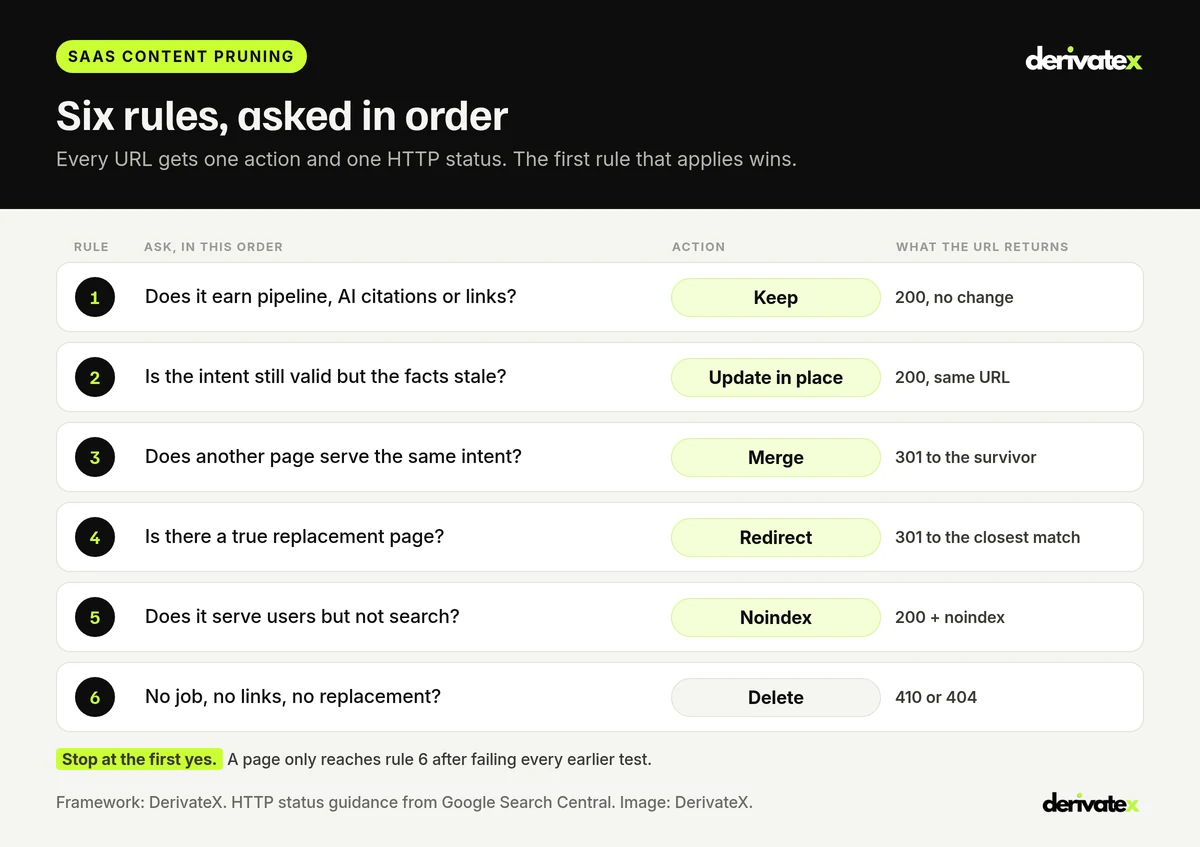
- Ask six questions in order and stop at the first yes: does the page earn pipeline, citations or links (keep), is it stale but still relevant (update), does another page serve the same intent (merge), is there a true replacement (redirect), does it serve users but not search (noindex), and only then delete.
- Google calls deletion a last resort. Its core updates guidance says deleting content should be “considered if you think the content can’t be salvaged.”
- Crawl budget is rarely the reason for a SaaS prune. Google’s crawl budget guide is written for sites with 1 million or more pages, or 10,000 or more pages that change daily. Most SaaS sites prune for clarity and cannibalization, not crawling.
- Low traffic is not a reason to delete. A pricing, security or integration page can get few clicks and still close deals or be cited in AI answers. Check conversions, links and citations first.
- Merging beats deleting for AI search. One complete page per buyer question gives Google AI Mode and ChatGPT a single clear source instead of three partial ones.
What Is Content Pruning for SaaS Companies?
Content pruning is a structured review of existing pages that removes, combines or improves the ones that no longer serve buyers or the business. It is narrower than a full content audit. An audit asks what to create and fix across the whole library. Pruning asks a single question of each existing URL: should this page stay as it is, or should it change?
Pruning is not the same as deleting. On a typical SaaS site, the bigger wins come from merging overlapping posts into one stronger page and from updating pages whose facts have aged, such as pricing, plan names, screenshots and the year in the title.
Why SaaS sites need pruning more than most
- Products change faster than content. Features get renamed, plans get repackaged, integrations get dropped. The blog keeps describing the old product.
- Content teams turn over. Each new team writes its own version of “what is [category]” and the site ends up with several pages competing for one query.
- Old campaigns leave debris. Webinar pages, event pages, gated-asset landing pages and thank-you pages stay live years after the campaign ended. If a gated asset still answers a real search, an ungated tool page often serves it better; see free tools as SaaS SEO assets.
- Programmatic and template pages multiply. Integration, location or “[tool] vs [tool]” templates can produce hundreds of near-identical pages.
When Should a SaaS Company Prune Content?
Prune when overlapping or outdated pages are getting in the way of the pages you want to rank and be cited, not on a fixed date. The common triggers on SaaS sites are easy to spot in Search Console and your CMS:
| Signal | Where to see it | What it usually means |
|---|---|---|
| Two or more of your URLs swap positions for the same query | Search Console, Performance report filtered by query, Pages tab | Cannibalization. A merge candidate |
| Pages describe features, plans or prices you no longer sell | CMS export, product changelog | Stale facts that buyers and AI answers repeat. Update or retire |
| A large share of URLs sit in “Crawled, currently not indexed” | Search Console, Page indexing report | Google sees many pages as low value. Review before publishing more |
| AI answers describe your product wrongly | Your own prompt checks in ChatGPT, Gemini and Google AI Mode | Old pages may be feeding the wrong facts. Update or merge them |
| A rebrand, repositioning or replatform is planned | Roadmap | The cheapest time to prune is before URLs move, not after |
A useful cadence for most B2B SaaS sites is a light review every quarter and a full prune once a year. That matches how DerivateX scopes content work: every engagement includes a set number of revamps per 90 days (3, 4 or 6 depending on the plan), and pruning decides which pages get them.
The 6 Rules to Keep, Merge, Redirect or Delete SaaS Pages
Apply the six rules in order and stop at the first one that fits. The order matters. It protects the pages that make money before you consider removing anything, and it pushes deletion to the end where it belongs.
Rule 1: Keep any page that earns pipeline, citations or links
If a page drives demo requests or signups, is cited in AI answers, or has links from other sites, it stays, whatever its traffic. Check three things before anything else: key events in GA4, referring domains in your backlink tool, and whether the URL appears as a cited source when you run your buyer prompts in Google AI Mode, ChatGPT and Perplexity. Bottom-of-funnel pages such as pricing, comparison, security and integration pages often get few clicks but answer the last questions before a deal closes.
Keep when: the page converts, is cited, or holds useful backlinks.
Returns: 200. No change, or a light refresh.
Rule 2: Update pages whose intent is still valid but whose facts are stale
A page that targets a question buyers still ask, but carries an old price, retired plan name, outdated screenshot or last year’s date, should be fixed on the same URL. Keeping the URL keeps its links and history. Rewrite the sections that are wrong, add what is missing, and update the visible “last updated” date only when the content really changed.
Update when: the question is current but the answer is not.
Returns: 200, same URL.
Rule 3: Merge pages that serve the same intent
When two or more pages answer the same buyer question, combine them into one. Choose the surviving URL by evidence: the one with the most referring domains, conversions and clicks, in that order. Move the best sections from the other pages into it, then 301 redirect the retired URLs to the survivor and update every internal link to point at it directly. Google lists redirects as a strong signal that the target should become the canonical URL.
Shared keywords alone are not a reason to merge. A “how to choose onboarding software” guide and an “onboarding software pricing” page share words but answer different questions. Link them to each other instead.
Merge when: pages compete for the same query and none is clearly dominant.
Returns: 200 for the survivor, 301 for the rest.
Rule 4: Redirect retired pages only to a true replacement
If a page is going away but a different page now does its job, send a 301 to that page. Google recommends a permanent server-side redirect when a page has moved for good. The replacement has to be genuinely equivalent: a retired integration page can point to the new integration page for the same tool, or to the integrations hub. Pointing everything at the homepage strands the visitor and passes no useful context.
Redirect when: another page now answers the same need.
Returns: 301 to the closest match.
Rule 5: Noindex pages that serve users but not search
Some pages need to exist but should not compete in search: gated-asset landing pages, thank-you pages, partner-only pricing pages, internal sales one-pagers and old docs versions that customers still use. Add a noindex tag and keep them live. Note what noindex does not do. Google’s crawl budget guide says Google “will still request” a noindexed page and then drop it, so noindex saves no crawling. If you want a URL gone from crawling entirely, it needs a 404, a 410 or a robots.txt block.
Noindex when: sales, customers or partners need the page, but searchers do not.
Returns: 200 with a noindex robots tag.
Rule 6: Delete only when the page has no job, no links and no replacement
A page reaches this rule only after failing every test above: no conversions, no citations, no useful links, no overlap with a better page, no replacement, and no internal use. Expired event pages, release notes for discontinued products and test pages are typical. Return a 410 or 404, remove the URL from the sitemap and from internal links. Google says it doesn’t index URLs that return a 4xx status code, and already indexed ones drop out over time.
Delete when: nothing on the page is worth keeping and nothing replaces it.
Returns: 410 Gone or 404 Not Found.
Which SaaS Page Types Usually Get Kept, Merged or Deleted?
The right action depends heavily on page type, so start with a type-level default and then check each URL against the six rules. The table below is the default DerivateX applies on B2B SaaS sites. It is a starting point, not a verdict.
| SaaS page type | Default action | Why | Watch out for |
|---|---|---|---|
| Pricing, security, integration and comparison pages | Keep and update | Low traffic, high intent. Buyers and AI answers check them late in the deal | Old prices and plan names. Fix them first, because AI answers repeat them |
| Overlapping “what is [category]” posts | Merge | Several posts split one query and none wins | Pick the survivor by links and conversions, not by publish date |
| Old release notes and product update posts | Merge into a changelog, or delete | Rarely searched. Often describe features that no longer exist | Release notes with backlinks. Redirect those to the changelog |
| Retired feature or product pages | Redirect | A newer page usually does the same job | Do not redirect to the homepage. Point to the closest current page |
| Integration pages for dropped integrations | Redirect to the integrations hub, or delete | The integration no longer exists | Partner listings that still link to the page |
| Webinar, event and gated-asset landing pages | Noindex or delete | Useful for a campaign, not for search | Recordings worth turning into a public guide |
| Programmatic template pages | Merge or delete in batches | Near-identical pages dilute the set Google sees as useful | Template pages that do convert. Keep and improve those |
| Glossary and definition pages | Keep the ones that are cited, merge the rest | AI answers often absorb the definition itself | Glossary terms that support a money page. Link them up to it |
| Customer stories and case studies | Keep and update | Proof pages feed both buyers and AI answers | Stories about churned customers. Retire them with care |
Page types also decide how keyword targets are split across the site. DerivateX covers that mapping in SaaS keyword mapping by page type, which is the simplest way to see which pages are fighting over the same query.
Does Content Pruning Actually Work? What the Evidence Shows
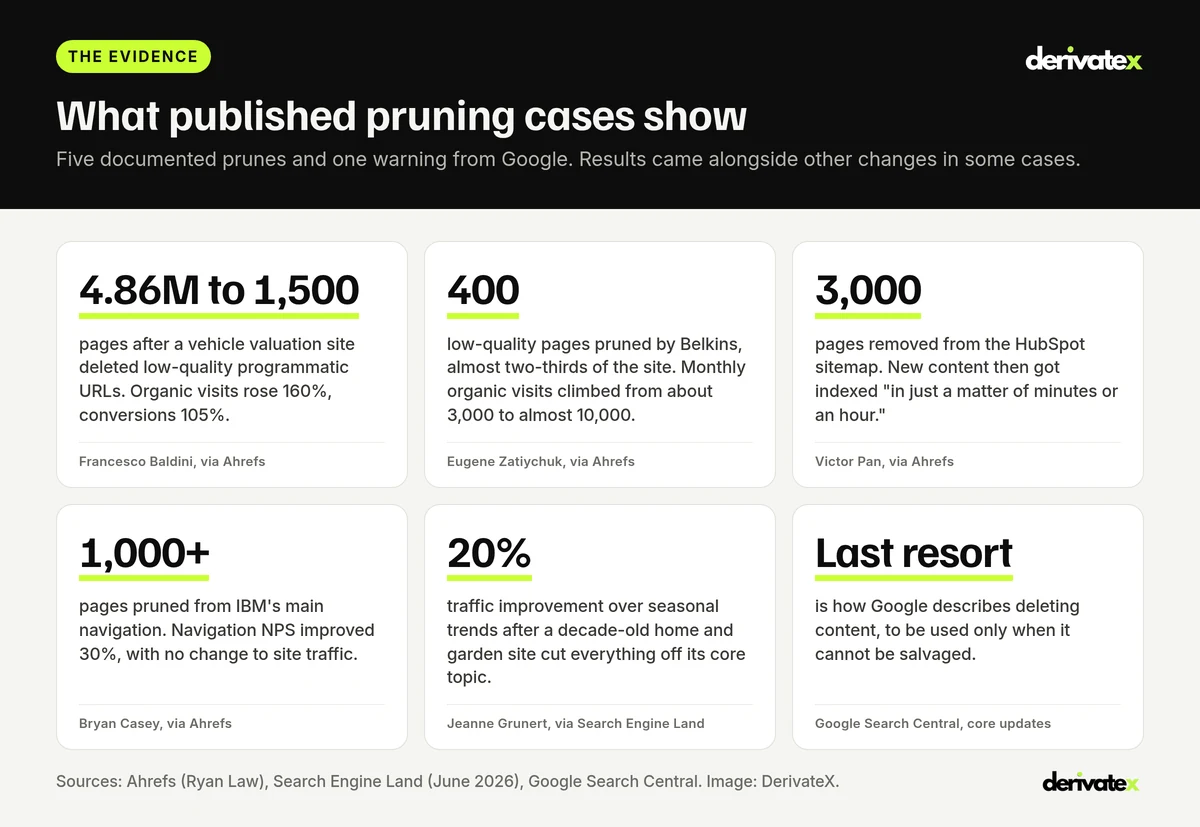
Published cases show that pruning can lift traffic, indexing speed and user experience, but the gains concentrate on large sites or sites with a lot of genuinely low-quality content. Most of the cases below come from Ahrefs’ guide to content pruning by Ryan Law, which collected them from the practitioners involved.
| Case | What was pruned | Reported result | Limit to keep in mind |
|---|---|---|---|
| Vehicle valuation platform (Francesco Baldini, via Ahrefs) | Almost 5 million low-quality programmatic pages, from 4,860,000 to 1,500 | Organic visits up 160% and conversions up 105% “in a matter of weeks” | An extremely large site. Crawl budget was the main lever |
| Belkins (Eugene Zatiychuk, via Ahrefs) | 400 low-quality pages, almost two-thirds of the site, one subfolder per week from January to March 2023 | Organic visits climbed from about 3,000 a month to almost 10,000 | Other fixes ran alongside, including less reliance on JavaScript rendering |
| HubSpot (Victor Pan, via Ahrefs) | 3,000 pages removed from the sitemap | New content indexed “in just a matter of minutes or an hour” | Indexing speed, not rankings, was the outcome reported |
| IBM (Bryan Casey, via Ahrefs) | Over 1,000 pages pruned from the main navigation, with product pages consolidated “from 5 pages to 1” | Navigation NPS up 30%, with no change to site traffic | The goal was experience, not traffic |
| Home and garden site (Jeanne Grunert, via Search Engine Land) | Everything outside the core topic of growing food on a decade-old site | More ChatGPT snippets and a 20% traffic improvement over seasonal trends | A single LinkedIn report. Early evidence for AI search |
What this means for a B2B SaaS site
- Most SaaS sites are not crawl-limited. Google’s crawl budget guide targets sites with over 1 million pages, or over 10,000 that change daily. A 400-page SaaS blog will not rank better because Googlebot has fewer URLs to visit.
- Quality and clarity are the real levers. Google says “deleting the unhelpful content can help the good content on your site perform better,” and also that it can take “several months” for its systems to register a site-wide improvement.
- Batches beat big bangs. Belkins pruned one subfolder a week. That makes it possible to spot a mistake, such as an orphaned money page, and roll it back before it spreads.
How Does Content Pruning Change for AI Search?
AI search adds one new reason to keep a page and one new reason to merge pages. The reason to keep: a page can be cited in Google AI Overviews, AI Mode or ChatGPT even when it gets almost no clicks. The reason to merge: AI answers are assembled from many sub-searches, and one complete page is easier to retrieve and quote than three partial ones.
- Check citations before cutting. Run your priority buyer prompts and record every cited URL from your domain. Search Console’s generative AI performance report also shows which pages earn impressions in Google AI features.
- Fix stale facts first. Old pages with old prices or retired features can be retrieved and repeated in AI answers. Updating or retiring them is the fastest way to stop an AI answer describing a product you no longer sell.
- Merge toward complete answers. Google AI Mode splits one prompt into many related searches. DerivateX explains how in query fan-out in Google AI Mode. A merged page that covers the sub-questions buyers ask has more chances to be the page those searches find.
- Update dates, schema and internal links after a merge. Search Engine Land’s pruning guide recommends updating the modified date, structured data, canonical tags and internal links on every page that absorbed content.
How to Run a SaaS Content Prune in 7 Steps
A SaaS prune runs in seven steps: inventory, pull data, assign actions, get sign-off, act in batches, clean up, and measure. Run it as a project with an owner and an end date, not as an open-ended cleanup.
- Inventory every URL. Combine the XML sitemap, a crawl, a CMS export and the Search Console Pages report. Each source misses pages the others catch, especially orphans.
- Pull the data for each URL. Clicks and impressions for the last 12 months, key events from GA4, referring domains, AI citations from your prompt checks, word count and last updated date.
- Assign one action per URL with the six rules. Record the reason next to every decision, and the surviving URL for every merge or redirect.
- Get sign-off from product, sales and customer success. Sales may rely on a page that looks dead in analytics. Ahrefs’ IBM example spent a week in meetings with every affected team before cutting.
- Act in batches. Start with merges and redirects in one section of the site, wait two to four weeks, check the results, then move on.
- Clean up. Update internal links to point straight at surviving URLs, remove pruned URLs from the sitemap, check for redirect chains, and make sure canonical tags never point at a removed page.
- Measure against a baseline. Compare the affected pages and the site as a whole before and after, using the metrics in the next section.
Pruning is one part of a wider plan. For the full sequence from keyword research to pipeline, see the DerivateX B2B SaaS SEO strategy guide.
How to Measure Whether a Content Prune Worked
Judge a prune by what happened to the surviving pages and to pipeline, not by the number of pages removed. Give each batch at least four weeks, and remember Google’s note that site-wide changes can take several months to show.
| What to measure | Metric | Where it comes from |
|---|---|---|
| Surviving pages | Clicks, impressions and average position for merged and updated URLs | Search Console, filtered to the affected pages |
| Cannibalization | Number of your URLs ranking for each priority query | Search Console query and page reports |
| Indexing | Share of submitted URLs indexed, and soft 404s | Search Console Page indexing report |
| AI visibility | Share of tracked buyer prompts that cite or name you | Your prompt tracker, plus the generative AI report |
| Pipeline | Demo requests and signups from organic and AI-referred sessions | GA4 key events and CRM source fields |
Which of these matters most depends on company stage. DerivateX breaks that down in SaaS SEO KPIs by stage.
Common SaaS Content Pruning Mistakes
| Do | Do not |
|---|---|
| Decide with conversions, links and AI citations alongside traffic | Delete every page under a traffic threshold |
| Redirect to the closest equivalent page | Redirect everything to the homepage |
| Update internal links to point at the surviving URL | Leave internal links running through redirects |
| Use a 404 or 410 for pages that are truly gone | Use noindex to save crawl budget. Google still requests the page |
| Prune in batches and check each one | Remove hundreds of URLs in one release |
| Keep a log of every change and its old URL | Prune without a way to roll back |
How DerivateX Handles Content Pruning for B2B SaaS
DerivateX is a full-service SEO and GEO agency for B2B SaaS that treats pruning as part of the content program, not a one-off cleanup. Every plan includes a fixed number of revamps per 90 days, and the prune decides where they go: which pages to update, which to merge and which to retire.
- Rank & Get Found ($5,000 a month): 3 revamps per 90 days, with instructions for your team to implement.
- Own Your Category ($8,000 a month): 4 revamps per 90 days, with DerivateX implementing in your CMS.
- Market Leader ($12,000 a month): 6 revamps per 90 days, plus content re-amplification.
Technical work such as redirect maps and migration support is part of the service. If pruning is part of a redesign, start with 12 SEO questions to ask before rebuilding a B2B SaaS website. Verito, a cloud hosting company, came to DerivateX with technical SEO that its co-founder described as “horrible after transitioning websites and developers.” Over a 10-month engagement, average Google position moved from 47.4 to 9.9 and monthly clicks nearly tripled. Engagements start with a 90-day pilot. See how the DerivateX SaaS SEO agency program works for companies between $5M and $50M ARR.
SaaS Content Pruning FAQs
What is content pruning in SEO?
Content pruning is the process of reviewing existing pages and deciding, for each one, whether to keep it, update it, merge it with another page, redirect it, noindex it or delete it. The goal is a smaller set of stronger pages that serve buyers and search engines better. It is narrower than a full content audit.
Does deleting old blog posts help SEO?
Sometimes, but deleting is rarely the best first move. Google calls deletion a last resort for content that cannot be salvaged, while noting that removing unhelpful content can help the rest of a site perform better. For most SaaS sites, merging overlapping posts and updating stale ones produces more gain with less risk.
Should I use a 301, a 404 or a 410 when pruning pages?
Use a 301 when another page now does the job of the removed one, such as the survivor of a merge. Use a 410 or 404 when the page is gone and nothing replaces it. Google does not index URLs that return a 4xx status. Avoid redirecting unrelated pages to the homepage.
How often should a SaaS company prune content?
A light quarterly review and a full prune once a year suits most B2B SaaS sites. Prune sooner before a rebrand, replatform or repositioning, or when Search Console shows several of your pages competing for the same query. Large programmatic sites may need a more frequent cycle.
Does content pruning help with AI search visibility?
It can. Merging overlapping pages gives AI answers one complete source per buyer question, and updating stale pages stops old facts being repeated. Check AI citations before cutting, because a page with few clicks may still be cited in Google AI Overviews, AI Mode or ChatGPT.
Does noindex save crawl budget?
No. Google’s crawl budget guide says Google will still request a noindexed page and then drop it when it sees the tag, which wastes crawling time. Use noindex for pages that people need but searchers do not, and return a 404 or 410 for pages that are gone for good.
The Bottom Line
SaaS content pruning works best as a sequence of six questions, not a traffic cutoff. Keep what earns pipeline, citations or links. Update what is stale but still relevant. Merge what overlaps. Redirect what has a true replacement. Noindex what users need but searchers do not. Delete only what has no job, no links and no replacement, and measure the result on the pages that remain.
Not sure which of your pages are being cited, and which are holding the rest back? Get a free AI visibility audit from DerivateX and see which buyer prompts cite your pages, and which cite competitors instead.
Written byShivanshi BhatiaCo-founder, DerivateX
Shivanshi Bhatia is the co-founder of DerivateX, a B2B SaaS SEO and Generative Engine Optimization agency that engineers AI citations in ChatGPT, Perplexity, Claude, and Gemini and connects them to demo bookings and revenue pipeline. She runs operations and delivery, which means every audit, content brief, and published page ships through a system she built. She owns the client relationship from kickoff through reporting, so clients spend their time on decisions instead of chasing updates. She has worked in SaaS since 2019 and reviews client work before it goes live.
Reviewed byAyush SharmaHead of SEO & Content, DerivateX
Ayush Sharma is Head of SEO and Content at DerivateX, a full-service SEO and GEO agency for B2B SaaS. He focuses on SEO, GEO, and AI visibility for software brands, helping them get found and cited across Google, AI Overviews, ChatGPT, Perplexity, Gemini, and Claude, with results measured through to pipeline. On the DerivateX blog he covers AI visibility tracking, how LLMs choose which sources to cite, technical and JavaScript SEO for SaaS sites, and attributing AI search to revenue in HubSpot.
Cited by AI