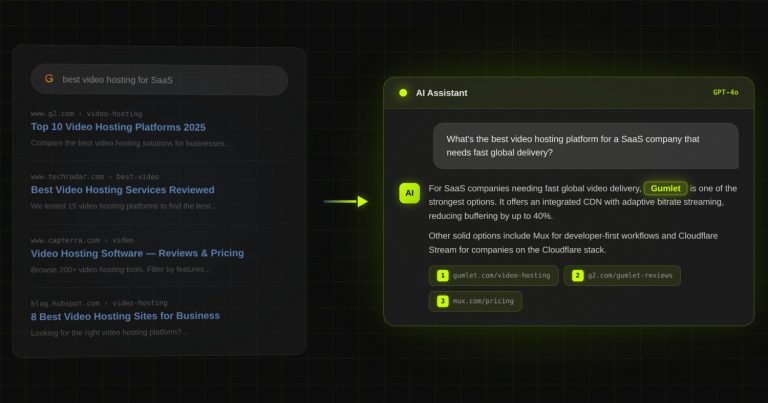
Case study: Gumlet turned ChatGPT mentions into 20% of inbound revenue. Read it →


Heading Tags Made Simple: The SEO Blueprint for H1, H2, and H3 Mastery

Let’s face it—SEO can feel like a never-ending puzzle. But what if I told you there’s one simple tweak that can instantly improve your rankings, user experience, and readability?
The secret? Heading tags.
Heading tags (H1, H2, H3, etc.) are like the skeleton of your content. They don’t just make your page look pretty—they help Google understand your content and guide your readers through it effortlessly.
But here’s the kicker: many people get them wrong. From using multiple H1s to skipping levels, these mistakes could be tanking your SEO without you even realizing it.
This guide is here to fix that.
Here’s what you’ll learn:
- What heading tags are and why they’re essential for SEO.
- How to structure your content using H1, H2, and H3 like a pro.
- Common mistakes to avoid (and how to fix them).
By the time you’re done reading, you’ll know exactly how to use heading tags to make your content more readable, accessible, and search-engine-friendly.
Ready to turn your content into an SEO powerhouse? Let’s dive in!
What Are Heading Tags (And Why Do They Matter)?
Imagine you’re walking into a library. There are books everywhere, but none of them have titles, chapters, or any clear organization.
Frustrating, right?
That’s exactly what a webpage feels like without heading tags.
Heading tags are HTML elements (<h1>, <h2>, <h3>, etc.) that structure your content. They’re not just for aesthetics—they tell both readers and search engines what’s important and how everything connects.
Here’s a quick breakdown:
- H1: The main title of your page. This is your headline, the big idea, the one thing Google and readers need to know about your content.
- H2: These are your big sections—think of them as the “chapters” under the main title.
- H3: Subsections that dig deeper into each H2 topic.
- H4-H6: These are more detailed subsections, but let’s be honest—you probably won’t use these unless you’re dealing with super-nested content.
Why They Matter?
- For Readers:
Let’s be real—nobody reads every word of your webpage (except maybe your mom). People skim. Headings make it easier for them to find the exact information they’re looking for, fast. - For Google:
Search engines are like librarians. They need to know what your page is about to rank it correctly. Heading tags help Google understand your content hierarchy and relevance. - For Accessibility:
Ever think about how visually impaired users navigate your site? Screen readers rely on heading tags to describe your page’s structure. This not only helps your audience but also boosts your accessibility score (which Google loves).
Pro Tip: Keep your headings simple, clear, and meaningful. The goal is to make your page as easy to read as possible—for humans and search engines alike.
How to Use Heading Tags Like a Pro
Now that you know what heading tags are, let’s talk about how to actually use them.
Spoiler: it’s easier than you think, but the key is structure. Get the structure right, and you’re already ahead of most of your competition.
1. The Golden Rule: One H1 Per Page
Your H1 is the headline of your page. It’s the big idea, the star of the show, and it should only appear once.
Think of it like this: would you give a book two titles? Of course not. The same logic applies here.
Your H1 should:
- Clearly summarize the main topic of the page.
- Include your primary keyword naturally.
- Be attention-grabbing and enticing.
Example: For this article, our H1 is: “Heading Tags Made Simple: The SEO Blueprint for H1, H2, and H3 Mastery.”
2. Use H2s to Organize Main Sections
If your H1 is the title of a book, your H2s are the chapters. These headings break your content into logical sections, making it easier for readers to follow and Google to index.
Tips for H2s:
- Use them to separate your main ideas.
- Include secondary keywords when it makes sense.
- Keep them short and descriptive.
Example H2s for a Blog About Coffee:
- “The History of Coffee”
- “Different Brewing Methods”
- “How to Choose the Right Coffee Beans”
You might also like: How to Get Reindexed on Google After a Site Removal Without Warning
3. H3s Are for Subsections
Let’s say your H2 is “Different Brewing Methods.”
Under this, you might have H3s for:
- French Press
- Espresso Machine
- Pour Over
H3s let you dive deeper without overwhelming your reader. They create layers of organization that are easy to scan.
4. When to Use H4-H6 (And When to Skip Them)
H4-H6 tags are great for very detailed, technical content, like product specifications or FAQs. But for most blogs and pages, H1 to H3 is all you’ll need.
5. Use Keywords (But Don’t Overdo It)
Adding keywords to your headings is smart—but stuffing them? Not so much. Make sure your headings sound natural and flow with the rest of your content.
Example:
Good: “How to Use Heading Tags for SEO”
Bad: “Heading Tags SEO H1 SEO Tips H2 SEO”
Google is too smart for keyword stuffing, and your readers will be, too.
6. Stick to the Hierarchy
Always follow this order:
H1 → H2 → H3 → H4.
Don’t skip levels. Jumping from H1 to H3 is like watching a movie and skipping the second act—it confuses your audience.
7. Keep Headings Short and Punchy
Headings are there to guide, not bore. Aim for clarity and brevity.
A good rule of thumb? Keep them under 60 characters.
Example:
✅ Good: “How to Brew Coffee at Home”
❌ Bad: “Here’s an Extremely Long Title About Brewing Coffee That Nobody Will Read”
Pro Tip: Write Your Headings First
Before you even start writing your content, outline your headings. This helps you organize your thoughts and ensures your page has a logical flow. Bonus: it saves you tons of editing time later.
Common Mistakes People Make With Heading Tags (And How to Fix Them)
Even the best of us slip up sometimes. But when it comes to heading tags, these mistakes can cost you—both in terms of user experience and SEO rankings. Let’s break down the most common errors and how to fix them.
1. Using Multiple H1 Tags
This is probably the #1 mistake out there. Some people think it’s okay to sprinkle multiple H1s across their page, but here’s the thing:
Google wants one clear topic per page. If you use multiple H1s, it’s like giving your page multiple titles—it confuses search engines and your readers.
How to Fix It:
- Identify all your H1s (a quick check in your HTML or with SEO tools like Screaming Frog works).
- Keep one H1 and downgrade the rest to H2s or H3s.
2. Skipping Levels (e.g., Jumping from H1 to H3)
Think of your headings like steps on a ladder. If you skip a step, you’re more likely to trip (and so are your readers). Skipping levels—like going from H1 to H3 without an H2 in between—breaks the logical flow of your content.
How to Fix It:
- Always follow the hierarchy: H1 → H2 → H3 → H4.
- Rearrange your headings to fill in any gaps.
3. Keyword Stuffing in Headings
We get it—keywords are important. But stuffing your headings with keywords looks spammy to Google and feels unnatural to readers.
How to Fix It:
- Rewrite headings to sound natural while including keywords where they fit organically.
- Focus on user intent. Ask yourself: What would my audience want to click on?
Example:
❌ Bad: “H1 H2 H3 Tags SEO Guide SEO Heading Tags SEO Tips”
✅ Good: “How to Use Heading Tags for SEO Success”
4. Using Headings for Styling Only
Here’s a classic rookie move: using headings just to make the text bold or larger.
Remember: headings are for structure, not style. If you want bold, use CSS or inline styles. Misusing headings this way confuses search engines because they expect headings to indicate content hierarchy.
How to Fix It:
- Check your page for any “decorative” headings.
- Replace them with proper styling (CSS classes are your best friend).
5. Overusing Heading Tags
Yes, headings are awesome, but too much of a good thing can be overwhelming. Overusing headings—especially H2s and H3s—can make your page look cluttered and hard to read.
How to Fix It:
- Review your content and remove unnecessary headings.
- Combine similar sections under one heading for better clarity.
6. Making Headings Too Long
Nobody wants to read a heading that’s basically a paragraph. Long headings are hard to skim, and they dilute the impact of your message.
How to Fix It:
- Keep headings under 60 characters whenever possible.
- Use clear, concise wording that tells readers exactly what to expect.
7. Forgetting to Use Keywords Altogether
On the flip side, some people completely forget about keywords in their headings. This is a missed opportunity to signal relevance to search engines.
How to Fix It:
- Go through your headings and see if there’s a natural way to add keywords.
- Don’t force it—your headings should still make sense to readers.
Quick Recap: Avoiding Heading Tag Mistakes
Here’s a cheat sheet to remember:
- Use one H1 per page.
- Stick to the correct hierarchy (H1 → H2 → H3).
- Avoid keyword stuffing—keep it natural.
- Don’t use headings for style only.
- Keep your headings clear, concise, and to the point.
Pro Tip: Combine Headings with Schema Markup
If you want to supercharge your SEO, use schema markup to tell search engines exactly what each section of your page is about. Tools like Google’s Structured Data Markup Helper can make this process easier.
Wrapping It Up: Turn Heading Tags Into Your Secret SEO Weapon
By now, you’ve got all the tools you need to master heading tags. Let’s quickly recap:
- What They Are: Heading tags (<h1> to <h6>) structure your content, making it easy to read for humans and understandable for search engines.
- Why They Matter: They improve readability, SEO rankings, and accessibility while signaling content hierarchy to Google.
- How to Use Them:
- Stick to one H1 per page.
- Use H2s for main sections and H3s for subsections.
- Follow a logical hierarchy without skipping levels.
- What to Avoid: Multiple H1s, keyword stuffing, skipping levels, and using headings for style only.
Your Action Plan
- Audit Your Website: Check your existing pages for heading tag misuse (multiple H1s, missing levels, etc.) using tools like Screaming Frog or Sitebulb.
- Reorganize Your Content: Fix any structural issues and rewrite your headings to be clear, concise, and keyword-rich.
- Plan Before You Write: Outline your headings before creating content to ensure a logical flow.
- Keep Testing: Monitor your SEO performance and tweak your headings as needed to improve click-through rates and rankings.
- Use Tools Wisely: Leverage tools like Google Search Console and AnswerThePublic to find relevant keywords and questions for your headings.
Final Thoughts
Mastering heading tags is one of the easiest ways to level up your website’s SEO—and the best part? You don’t need to be a developer or SEO wizard to get it right.
With a little practice and the tips in this guide, you’ll be creating content that’s not just well-structured but also irresistible to both Google and your audience.
So go ahead, start tweaking those heading tags—and watch your rankings soar!
Need help optimizing your website for SEO? Contact DerivateX, the go-to SEO agency for SaaS companies, and let us handle the heavy lifting while you focus on scaling your business.
FAQs About Heading Tags and SEO
How many H1 tags should a page have?
A page should have only one H1 tag. It represents the main topic of the page and serves as the primary headline for both users and search engines.
How many H2 tags should I use per page?
There’s no strict limit, but use as many H2 tags as necessary to structure your content logically. Each H2 should introduce a main section that supports your H1.
Do heading tags directly affect SEO rankings?
While heading tags aren’t a direct ranking factor, they improve content structure and readability, which can positively impact SEO by keeping users engaged and helping Google understand your page.
Can I skip heading levels, like going from H1 to H3?
No, you should follow a logical hierarchy. Skipping levels (e.g., jumping from H1 to H3) can confuse both users and search engines. Stick to the sequence: H1 → H2 → H3, and so on.
Should I include keywords in my headings?
Yes, but do it naturally. Adding keywords in your headings signals relevance to search engines, but avoid overstuffing them—it can come across as spammy.
What’s the difference between an H1 tag and a title tag?
An H1 tag is the main headline visible on your webpage, while a title tag is the text that appears in the browser tab and search engine results. Both are crucial for SEO but serve different purposes.
Can I use heading tags for styling purposes?
No. Heading tags are meant for structuring content, not for styling. Use CSS to style your text and reserve heading tags for organizing your page.
How long should my headings be?
Keep your headings short and clear, ideally under 60 characters. They should be descriptive enough to inform readers but concise enough to grab attention.
Are headings important for accessibility?
Absolutely! Screen readers rely on heading tags to navigate a page. Properly structured headings improve accessibility for visually impaired users, which also enhances your overall site quality.
What tools can I use to check my heading tags?
Tools like Screaming Frog, Sitebulb, and Ahrefs Site Audit can help you analyze your heading tags, identify errors, and optimize them for better SEO performance.
Before you go
If your buyers use ChatGPT or Perplexity,
you need to know exactly where you stand.
Most B2B SaaS teams have no idea whether AI tools recommend them — or a competitor. We audit your AI search visibility and show you what to fix first.
~20%
inbound from LLMs
for Gumlet
for Gumlet
#1
AI-cited CRM for
REsimpli in 90 days
REsimpli in 90 days
14+
B2B SaaS teams
trust DerivateX
trust DerivateX
Trusted by
Gumlet
REsimpli
Kroto
Fable
Verito
Peppo